Concrete bids built from what your crew actually costs.
Measure your plans or type in the measurements, and CalcCon Pro works out the yards, forms, rebar, crew hours, equipment and the price per foot or each, for sidewalk, curb, ADA ramps, slabs, walls and more. Then it writes the bid proposal with your logo.
Windows PCsiPhone and iPadAndroidWorks without internet
Designed by a concrete contractor, from the way he bids his own jobs. One app for the whole office, from the plans to the punch list.
Watch a bid come together
Open the plans, measure, let the calculators price it from your costs, and the proposal is already written.
No sound. Captions are in the video.
How a bid comes together
Job details once, a calculator for each item, then the proposal. Nothing gets typed twice.
Fill in a calculator
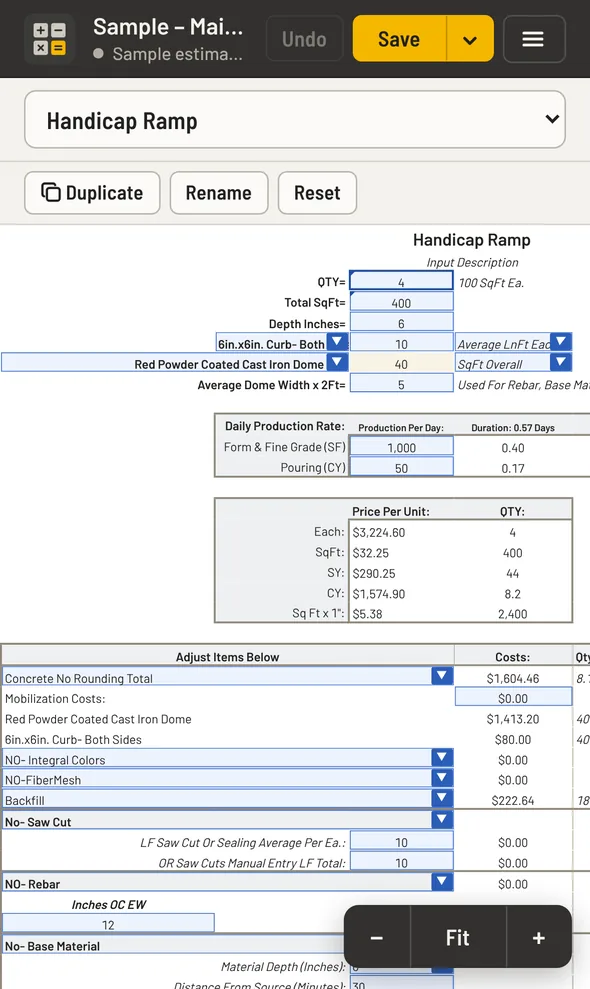
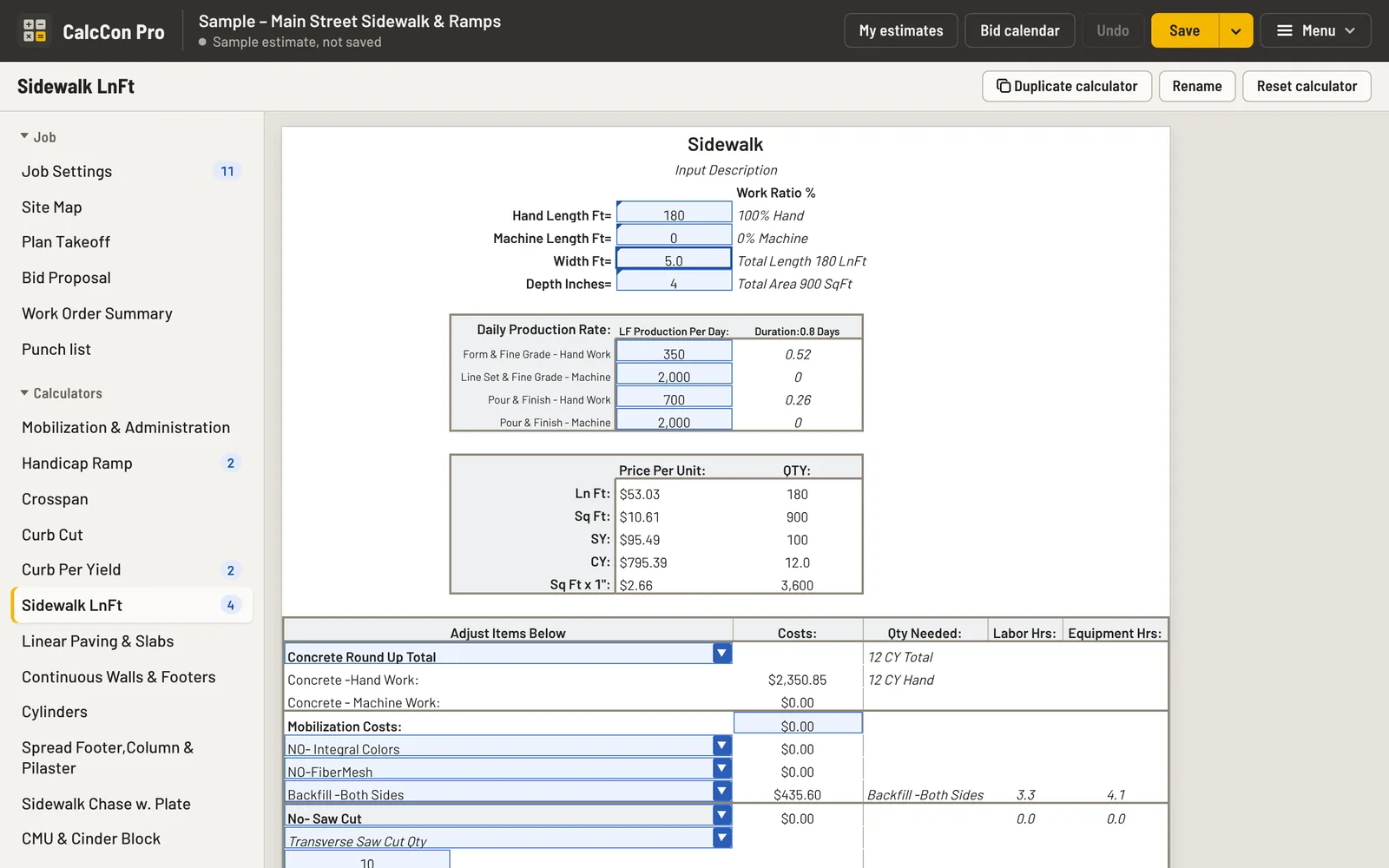
Lengths, widths and depths, hand or machine work. Each calculator works out the concrete with waste, forms, rebar, crew and equipment hours, and your price per foot, square foot, yard or each.
Need it twice? Duplicate a calculator for the north lot and the south lot, and name them. Or measure it on your plans with Plan Takeoff and the quantities fill in for you.
Check the materials, print the work order
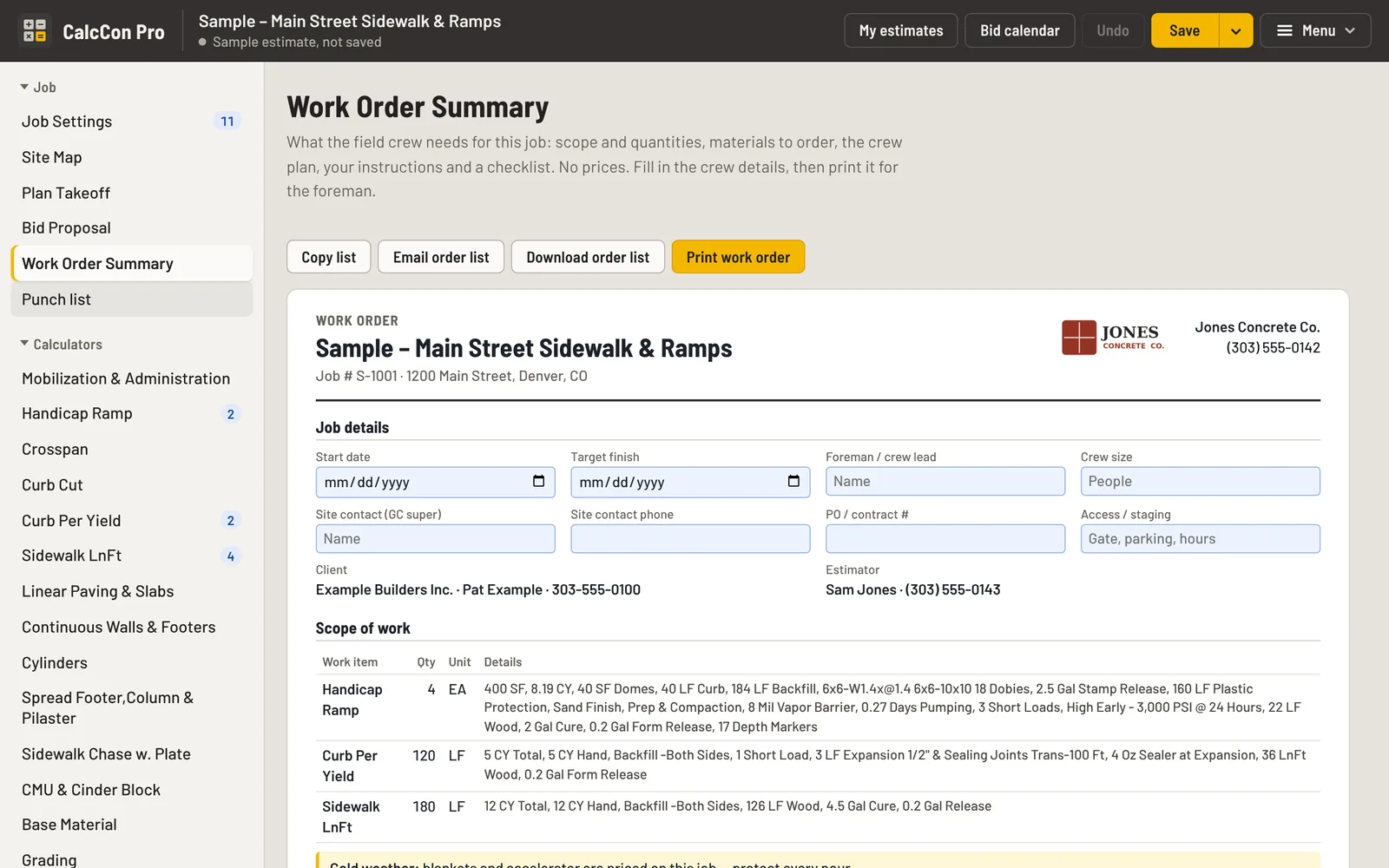
The Work Order Summary adds up every material across the job: concrete by the yard, forms, rebar, cure, expansion and the rest. Copy, email or download it as an order list for your supplier.
It’s also the crew’s work order, with no prices on it: scope and quantities, the crew plan (concrete, labor and equipment hours), your instructions, a field checklist and sign-off lines.
Send the proposal
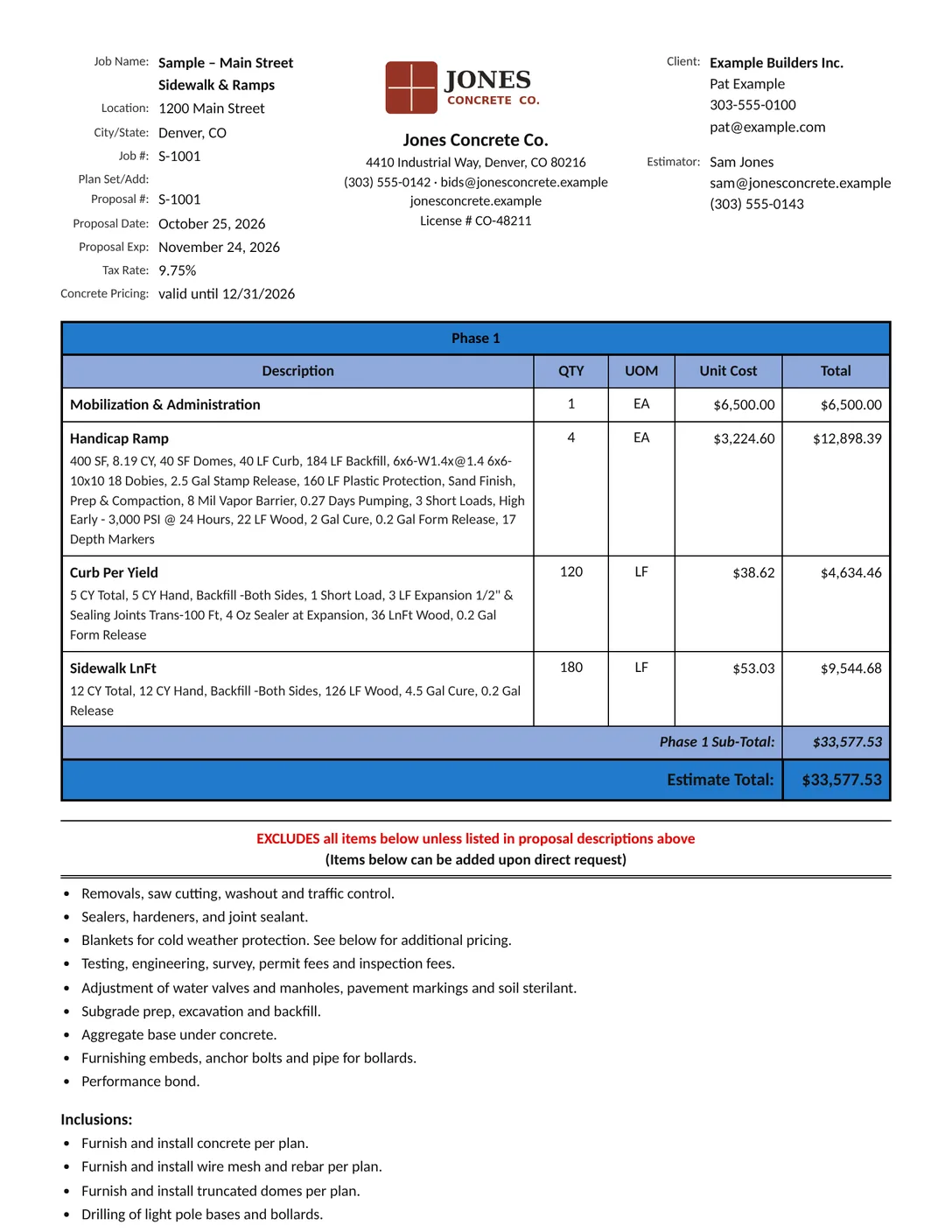
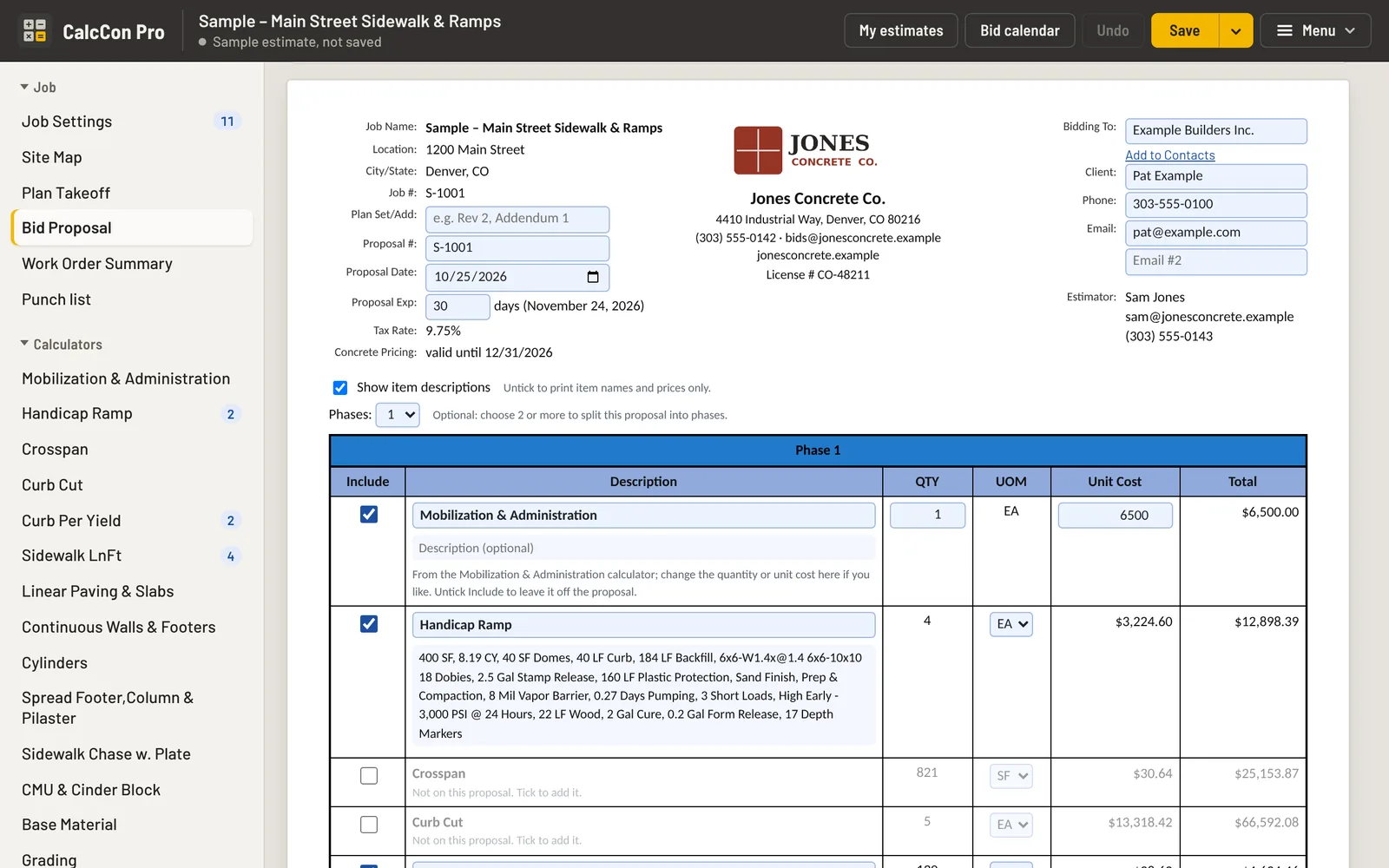
Every calculator you used is already on the bid proposal with quantity, unit cost and total. Split it into phases, add your exclusions and terms, then print it or save it as a PDF.
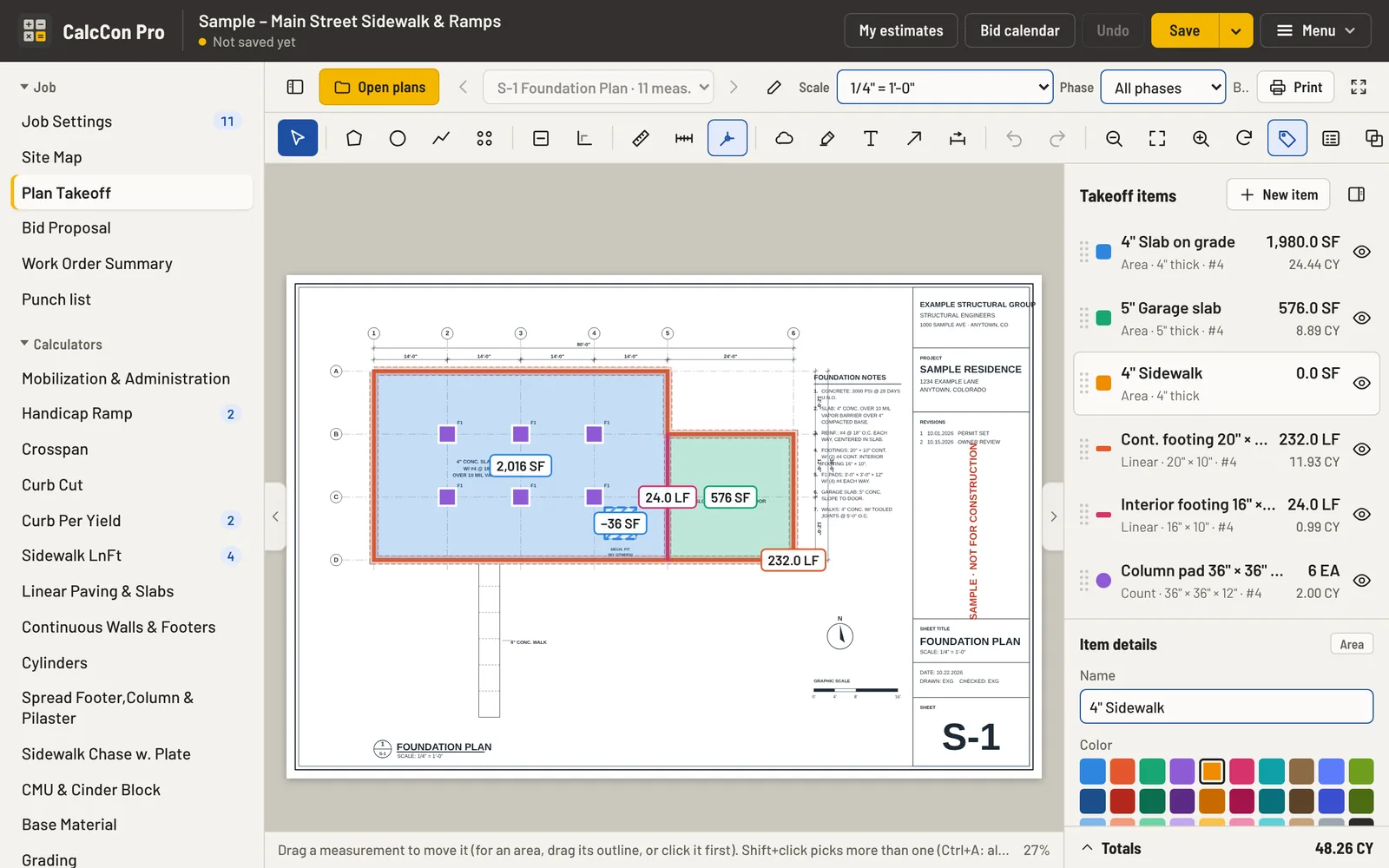
Measure the plans. The quantities fill your bid.
Plan Takeoff is built in, so nothing gets typed twice.
- Open your PDF plans: use the scale printed on the sheet when CalcCon Pro finds it, or calibrate from a dimension you know.
- Areas, circles, runs and counts, with curves and cutouts, for slabs, walks, footings, curbs, pads and piers.
- Rebar on every item: #3 to #8, at a spacing, continuous bars or bars each way.
- Send an item to a calculator and its sizes, quantities and rebar fill in. Change the item and the calculator follows.
- Phases and markups: split the takeoff into phases; add a legend, 30 colors with hatch patterns, clouds, highlights, text and arrows.
- Print the plans with your takeoff and the legend on them (the scale too), or export a CSV and copy the list for Excel.
A calculator for each thing you pour
Each one follows how the work is done, with crew, equipment and material lines you can change.
Priced from your numbers, not ours
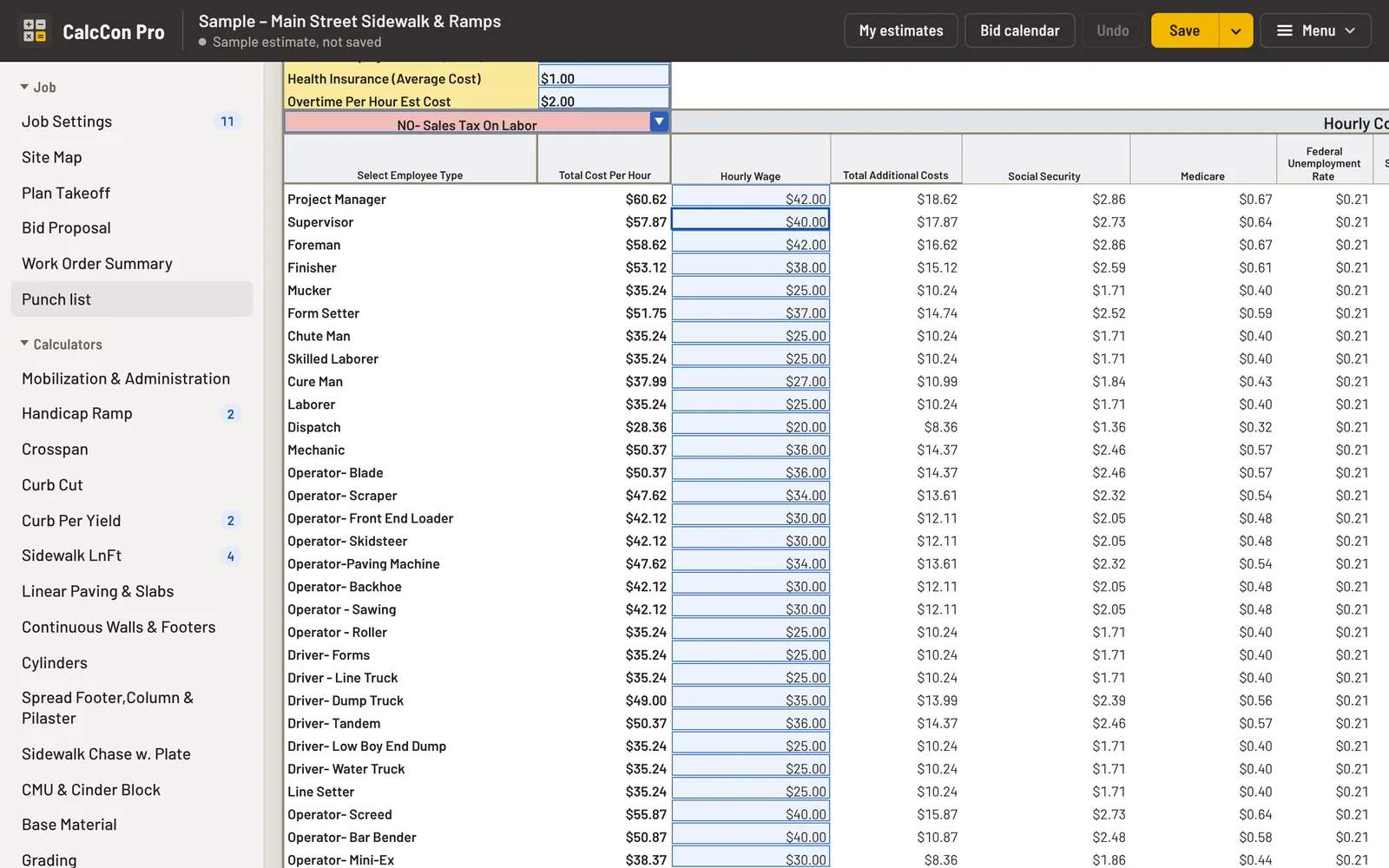
- Crew rates with the real burden: wages plus Social Security, Medicare, unemployment, workers’ comp, liability insurance and overtime.
- Equipment by the hour, with fuel and maintenance.
- Materials with your sales tax, your concrete price, and your overhead and profit.
- Your starting template: set your prices once and every new estimate starts from them.
- No stale prices: you’re warned when your concrete prices are about to expire, and shown any price you haven’t touched in six months.
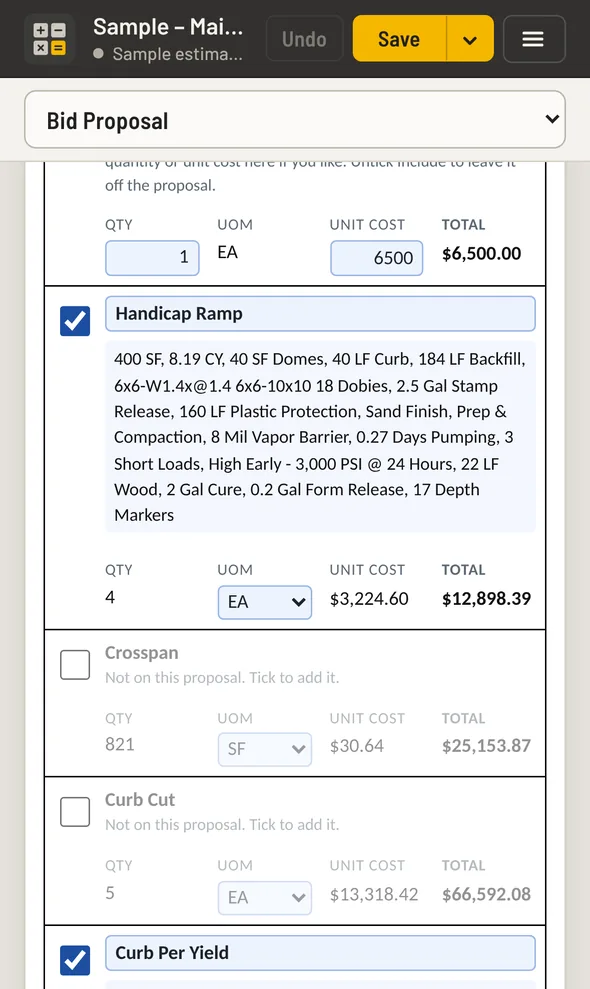
In the office and on the job
- Windows: its own window and icon, like any program.
- iPhone, iPad and Android: install it from the browser to the home screen. No app store.
- Works without internet. Your estimates stay on your own computer and phone, not on our servers.
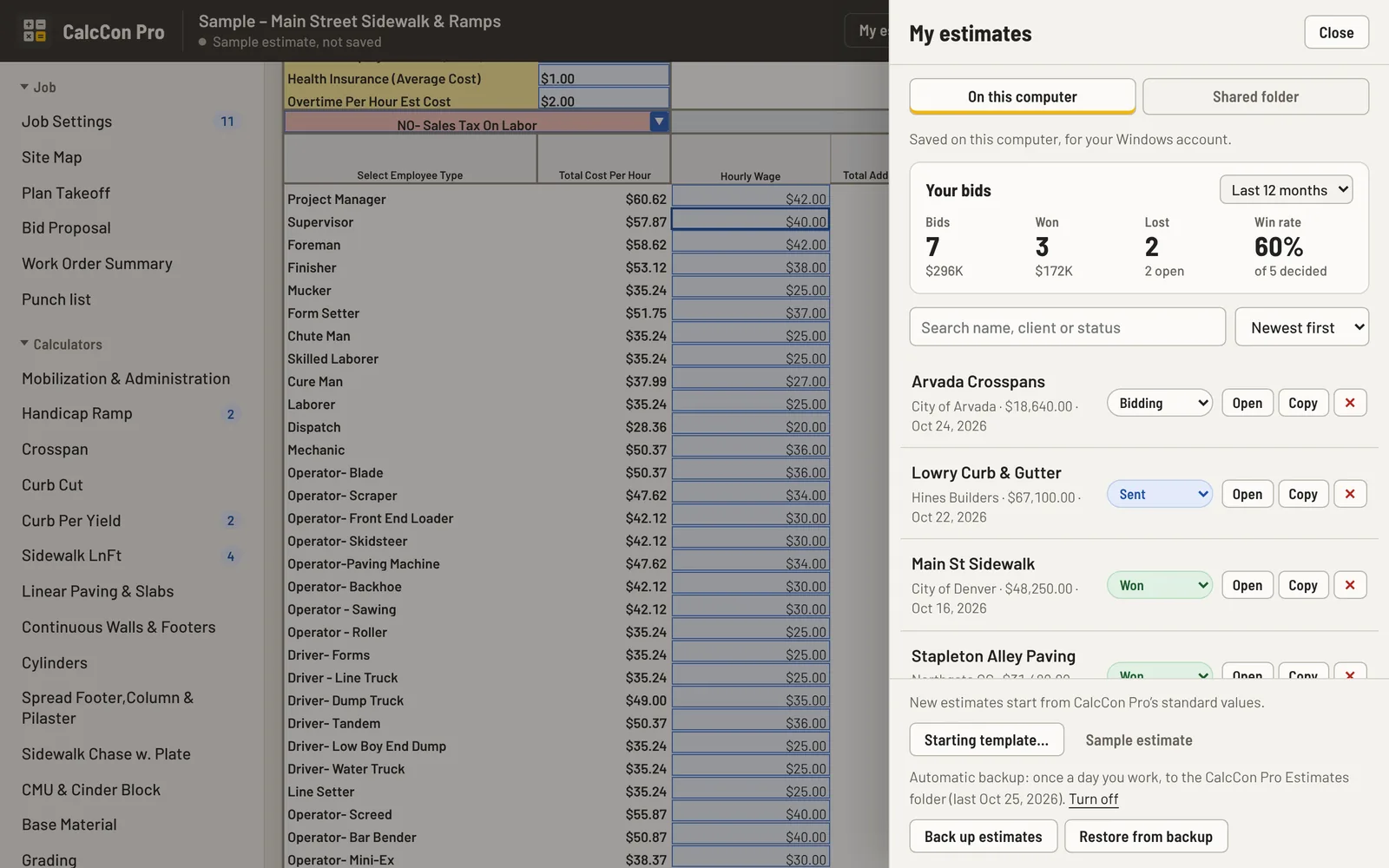
- Backed up: once a day on Windows, with a reminder on phones and tablets.
- Work as a team on Windows: share estimates, contacts and documents through a OneDrive, Dropbox or network folder.
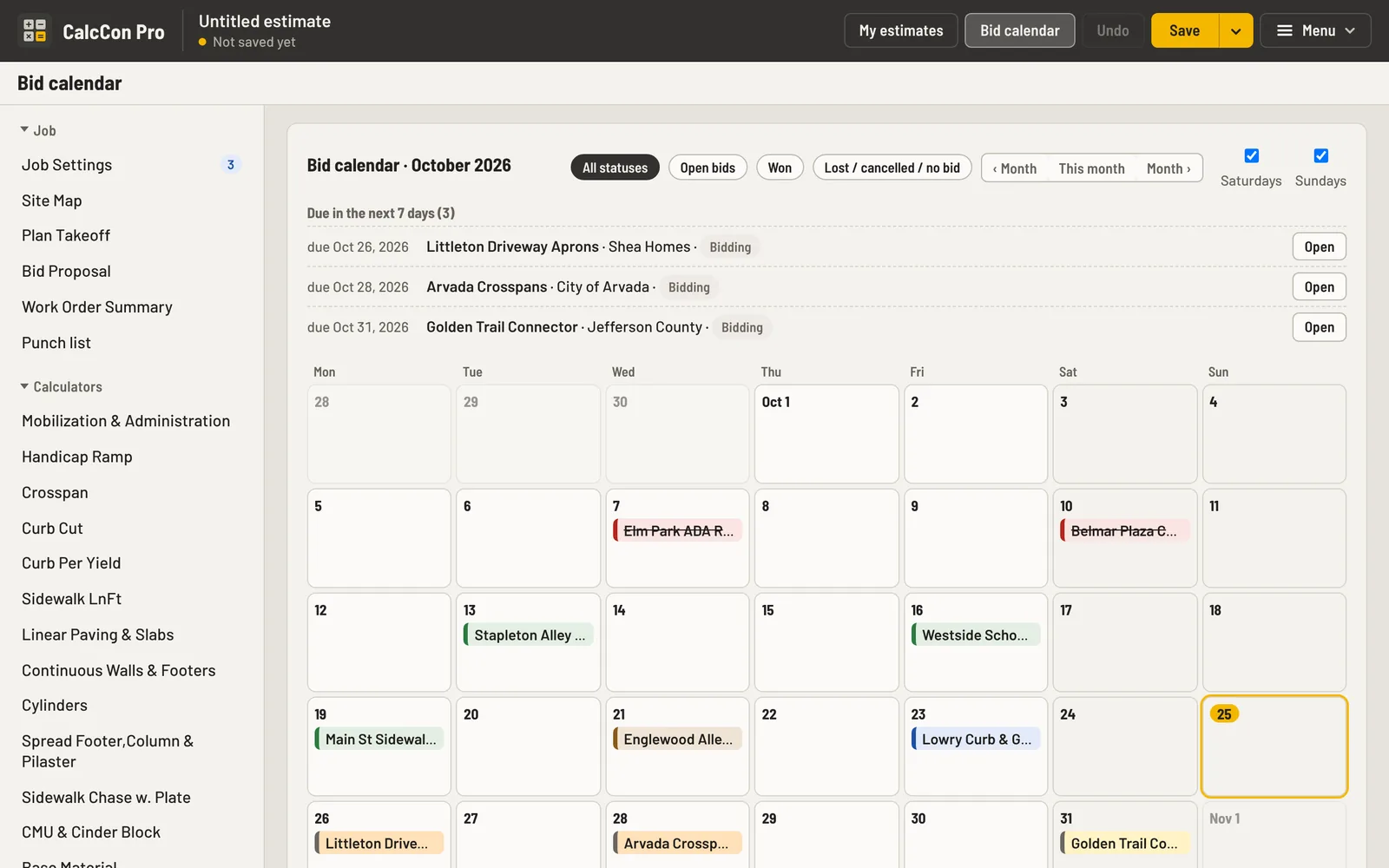
- Track every bid: from Bidding to Won or Lost, on the bid calendar, with your win rate.
Win the bid, then run the job
The Office side of CalcCon Pro picks up where the proposal leaves off. It’s all included; switch off anything you don’t use.
- Contacts and a jobs board. Customers, subs and suppliers in one list; every bid from Bidding to Won, then Contract, Scheduled, In progress, Complete, Invoiced and Paid.
- Bid calendar. Every bid on a month calendar by its due date, one color per status, with what’s due this week.
- Documents. Contracts, submittals, sub quotes, emails and plans filed with the job. PDFs and pictures open right in CalcCon Pro.
- Site Map. The job site on Google’s satellite view from the job address, with directions and Street View for the crew.
- Field and schedule. Daily logs with photos, a time clock, pour tickets, and a month schedule across jobs that flags a crew or the pump booked twice.
- Costs and billing. Estimate vs. actual on each job, pay applications with retainage, invoices and lien waivers to print, and a QuickBooks export.
- Punch list. Photos you can mark up, a pin on the plan, who fixes it and by when, a list for each sub, and the customer’s sign-off.
- Closeout. Warranty dates with reminders and a closeout package with every document for the job.
- Team. Several people on one account through a shared OneDrive, Dropbox or network folder on Windows: estimates, contacts and documents stay in sync.
One subscription, everything included
Try it free for 14 days first. No card needed.
- Every calculator, unlimited estimates and proposals
- Plan Takeoff for your PDF plans
- The Office: contacts, jobs board, bid calendar, documents, punch lists and more
- One subscription covers your computer, phone and tablet
- New versions as they come out
Renews each month or year until you cancel. Cancel any time; it keeps working to the end of the period you paid for. Subscription terms
Try CalcCon Pro free for 14 days
Takes about a minute: tell us who you are, download CalcCon Pro, and start the trial from inside it with one click. No card, no key to paste.
Install CalcCon Pro
Install it on each computer and phone you bid on. The free trial starts with one click inside CalcCon Pro; a subscription key is made for your devices.
Windows
Download for Windows- Open the download and choose Extract all.
- Double-click Install CalcCon Pro.
- When it opens, click Start my free trial, type your name and email, and you’re working. Nothing is charged.
- Subscribed? Paste the key we emailed you instead.
Windows 10 or 11, with Microsoft Edge or Google Chrome. Already installed? Do the same to update; your estimates stay.
iPhone, iPad and Android
Open the phone and tablet appOr type calcconpro.netlify.app/app/ on your phone.
- iPhone and iPad: open it in Safari, tap Share, then Add to Home Screen.
- Android: tap Install when Chrome offers it (or ⋮ menu, Install app).
iPhone and iPad need iOS 16.4 or later.
Current version 2026.10.25.40, released October 25, 2026.
Questions
How does per-user pricing work?
Each person who bids with CalcCon Pro has their own subscription. It covers that person’s Windows computer, phone and tablet (up to three devices). Keys are made for your devices’ activation codes, so they can’t be passed around.
What is an activation code?
When CalcCon Pro first opens it shows a code like CCA-XXXX-XXXX. Your key is made for that computer or phone. For the free trial you never touch it: click Start my free trial and CalcCon Pro sorts it out. When you subscribe, send the code with your order. New computer? Send us its code and we move your subscription over.
Can other people on my computer see my estimates?
You can lock CalcCon Pro with a password: open the Menu at the top right, click your license line (Free trial or Licensed to…), then Set a password. It asks for the password when it opens and after a while without activity. Forgot it? Your license key unlocks it.
Do I need the internet?
Only to install it, and for the few parts that come from the internet: the satellite Site Map, the weather on the Schedule, and checking for new versions. Estimates, Plan Takeoff and proposals work anywhere, including job sites with no signal.
Does it work on a Mac?
Not yet. CalcCon Pro runs on Windows 10 and 11, and on iPhone, iPad and Android phones and tablets. If you bid on a Mac, talk to us first.
Where are my estimates kept?
On your own computer, phone or tablet. They aren’t sent to us. On Windows, CalcCon Pro backs them up once a day into your CalcCon Pro Estimates folder, and your team can share estimates through a shared folder.
What do I need to run it?
A Windows 10 or 11 PC with Microsoft Edge or Google Chrome, an iPhone or iPad with iOS 16.4 or later, or an Android phone or tablet with Chrome.
Can I use my own prices?
Yes. Cost Settings and Material Install Settings hold your crew rates, equipment, materials, overhead and profit. Save them as your starting template and every new estimate uses them.
What happens when the trial ends?
CalcCon Pro reminds you during the last week. Subscribe on this page — monthly or yearly — and your subscription key comes by email, or Call, text or email us when you’re ready: we set up your monthly or yearly subscription and email your subscription key. Paste it into CalcCon Pro (Menu at the top right, then Free trial) and keep going. Everything you saved during the trial stays.
Is there a money-back guarantee?
Yes. If CalcCon Pro isn’t right for you, tell us within 30 days of your first payment, monthly or yearly, and we’ll refund that payment in full. Email or call us; our details are at the bottom of this page. Your subscription ends when we refund it.
How do I cancel?
Email or call us any time (Mike@calcconpro.com, 720-532-3554). That stops the next renewal; CalcCon Pro keeps working to the end of the period you paid for, and your estimates stay on your computer. The details are in the subscription terms.
Does it work with QuickBooks or Excel?
There’s no live connection to accounting software, but Billing exports invoices and customers in the layout QuickBooks Online’s import reads. Takeoff quantities export as CSV or copy straight into Excel, and the material order list copies, emails or downloads.
Can I talk to a person?
Yes. Michael Bukowski, who built CalcCon Pro, answers questions himself: call or text 720-532-3554, or email Mike@calcconpro.com. Or use the chat button at the bottom right of this page.
What if I stop subscribing?
CalcCon Pro locks a few days after your subscription ends. Your saved estimates stay on your computer and are there again when you renew; a backup file keeps a copy too.